Steam Achievement Manager
Control your Steam achievements and game stats with Steam Achievement Manager, a free Windows tool designed to unlock, reset, and manage your Steam progress. Download the latest version and take full control of your achievements today.
What is Steam Achievement Manager (SAM)?
Steam Achievement Manager is a third-party desktop utility that lets users view, unlock, lock, or reset achievements and related statistics for supported games in their Steam library.
While Steam’s built-in achievement system rewards players for completing specific in-game tasks, it can feel restrictive for some users. SAM offers more flexibility for those who want greater control over achievement states and profile progress. All it needs to run is the Steam client and an active Steam account. It runs while Steam is open and you’re logged in, giving users direct control over achievement states for completionists, testers, and curious players.
Steam Achievement Manager was created by Rick Gibbed, a developer known for PC modding tools and debugging utilities. It was first designed for developers and testers who needed fast access to achievement triggers, before gaining popularity with everyday players. The tool scans your Steam library, lists available achievements, and lets users apply changes with a single action while Steam is running.
Its interface is basic but functional, and it operates as a standalone third-party application that requires the Steam client to be running. SAM is not affiliated with Valve Corporation (the creators of Steam), works with many games that support Steam achievements, requires the .NET Framework 3.5, and runs as a standalone unpacked tool outside the Steam folder.
Things to Know About Steam Achievement Manager
Steam Achievement Manager is developed by Rick Gibbed, an independent programmer known for open-source gaming tools. The latest release is version 7.0.41, which includes fixes for missing integer statistics and other ongoing improvements.
- Steam Client: Installed, running, and logged in.
- Internet: Internet access is needed to sync achievements.
- .NET Framework: Microsoft .NET Framework 3.5 or higher.
- RAM: 2GB or more.
- Processor: A basic modern processor.
- Operating System: Windows 7, 8, 10, or 11.
Older versions had issues such as deprecated Steam API usage, limited code maintainability, and outdated visuals. The 7.0.x open-source releases improve usability and transparency:
- Unlock time column added (shows when achievements were unlocked)
- Code modernization (the open-source release improves maintainability and compatibility)
- Icon updates (replaced with the Fugue icon set for consistency)
- Steam API updates (replaced deprecated API usage and added support for newer Steam schemas)
- Version clarity (the 7.0.x series reflects the open-source release and long-term maintenance)
Download Steam Achievement Manager [Latest Version]

Steam Achievement Manager || 55 KB
How to Download and Install Steam Achievement Manager? [Complete Guide]
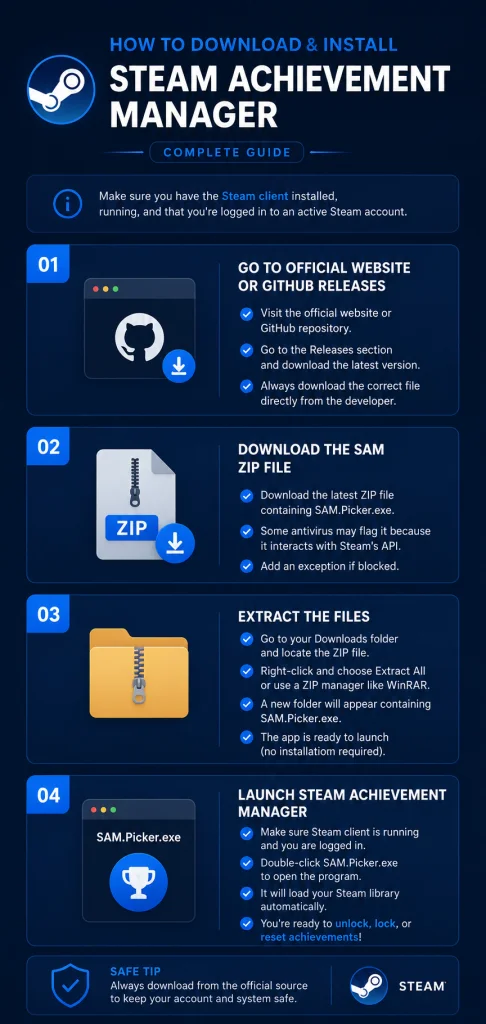
To download and install Steam Achievement Manager, make sure you have the Steam client installed, running, and that you’re logged in to an active Steam account. Let’s get started:
Step 1: Go to the Official Website or GitHub Releases
- Open your browser and go to the Steam Achievement Manager official website, or search for its GitHub repository.
- On GitHub, go to the Releases section and download the latest version. Always download the correct file directly from the developer and avoid unsafe or outdated copies.
Step 2: Download the SAM ZIP File
- When you click the download link, a ZIP file will be downloaded.
- On GitHub, you’ll need to download the ZIP file containing SAM.Picker.exe, which is used to browse your Steam library and launch the achievement manager for individual games.
Some antivirus programs may flag SAM.Picker.exe because it interacts with Steam’s API. Add an exception if your security software blocks the file.
Step 3: Extract the Files
- Go to your Downloads folder and locate the downloaded ZIP file.
- Right-click the file and choose Extract All, or use a ZIP manager such as WinRAR.
- Windows’ built-in extractor also works. A new folder will appear containing SAM.Picker.exe.
- The app is ready to launch from this folder, as it doesn’t require installation.
Step 4: Launch Steam Achievement Manager
- Confirm that the Steam client is running and that you are logged in.
- Double-click SAM.Picker.exe to open the program.
- The app will automatically load your Steam library, showing all installed and uninstalled games.
- After this, you’re ready to unlock, lock, or reset achievements across your supported Steam games.
How to Use the Steam Achievement Manager?
SAM can unlock Steam achievements that remain bugged and never trigger on their own. It is best suited for offline and single-player games. Here are the basic steps to get started:
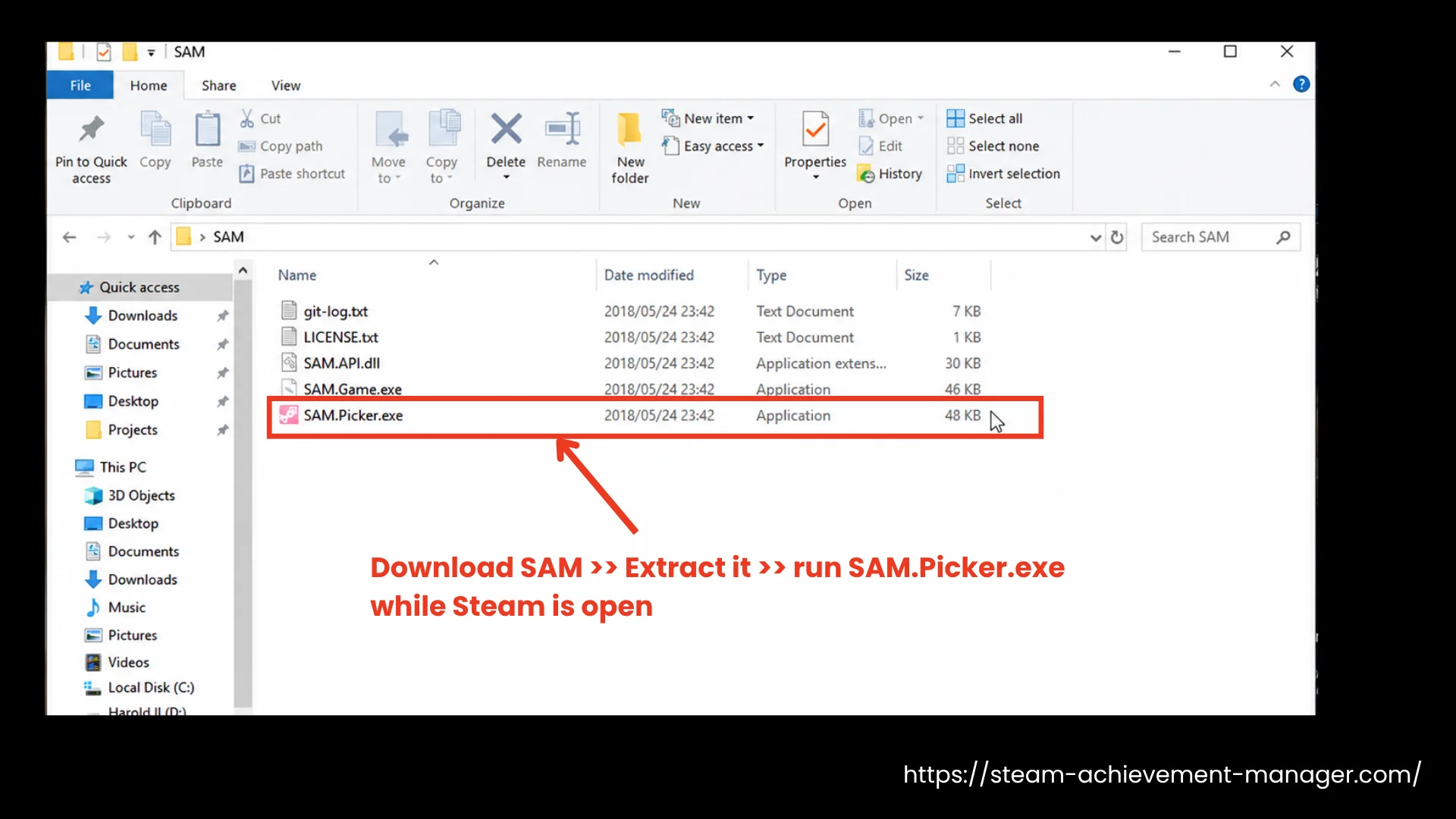
- Download SAM from our website, extract it, and run SAM.Picker.exe while Steam is open.
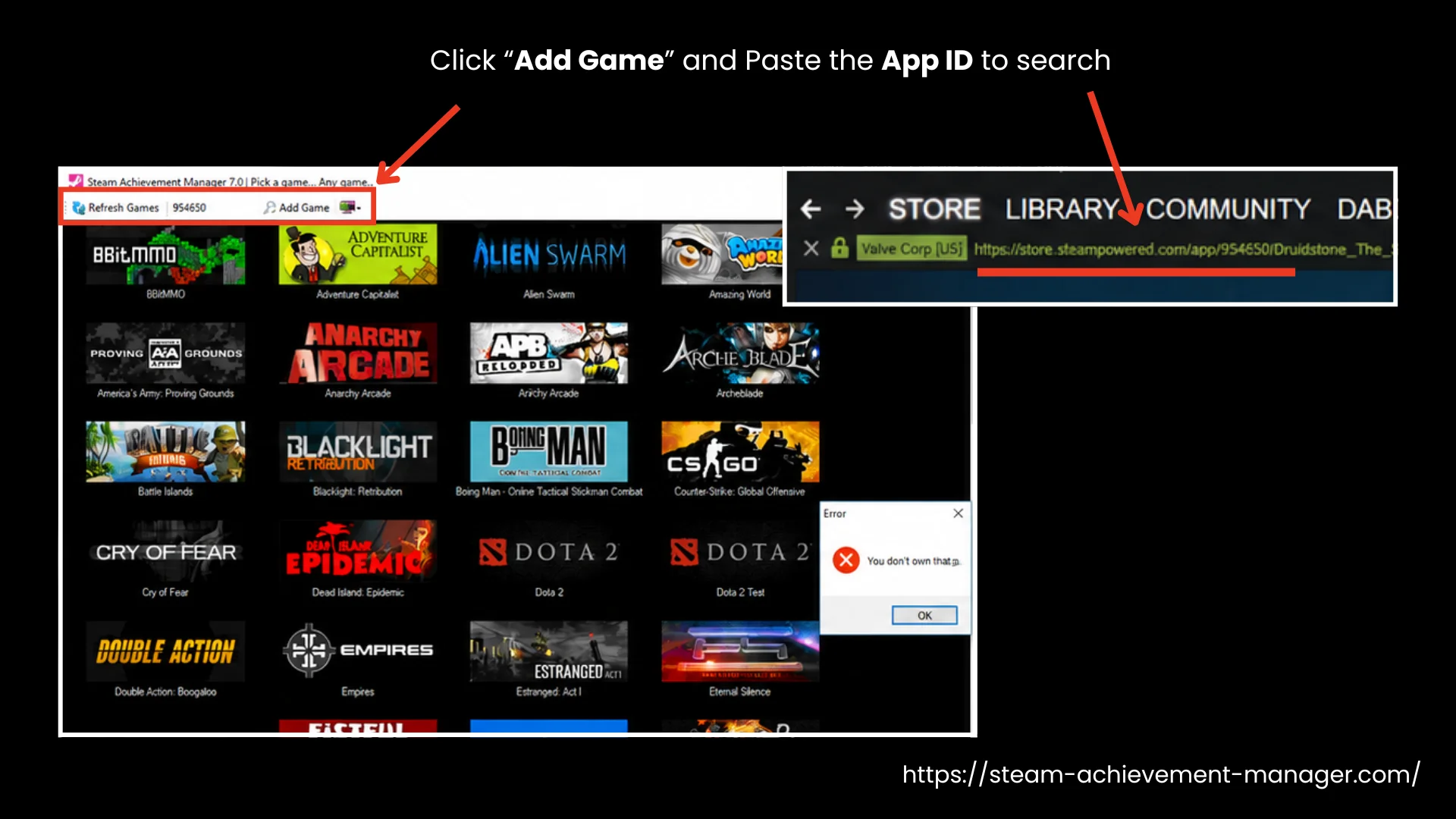
- Pick a game from the list or search for it. If a game is missing, click Add Game and paste its AppID from the Steam Store page URL.
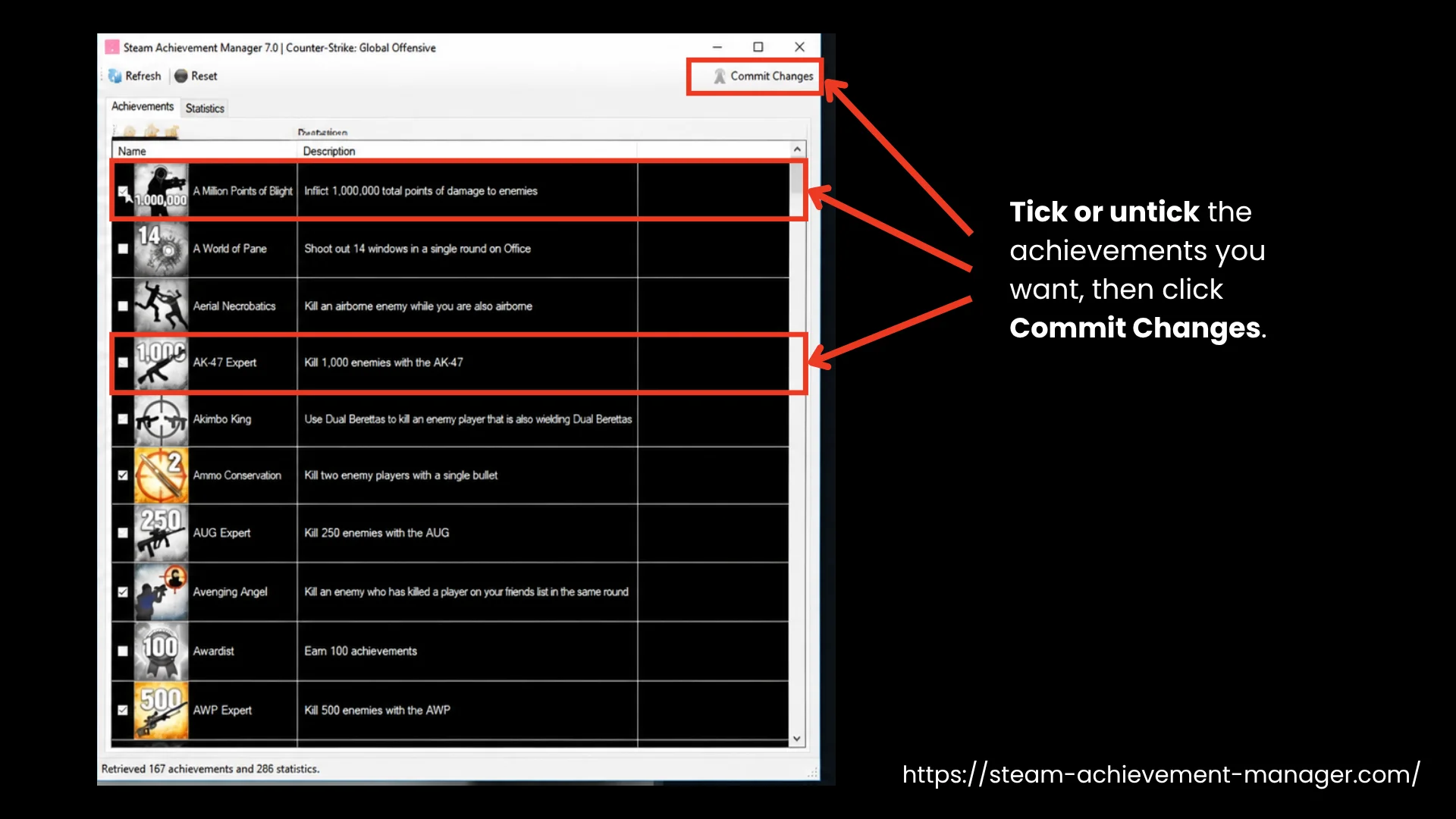
- Double-click the game to load its achievements. Checked boxes indicate earned achievements, while empty boxes indicate locked achievements.
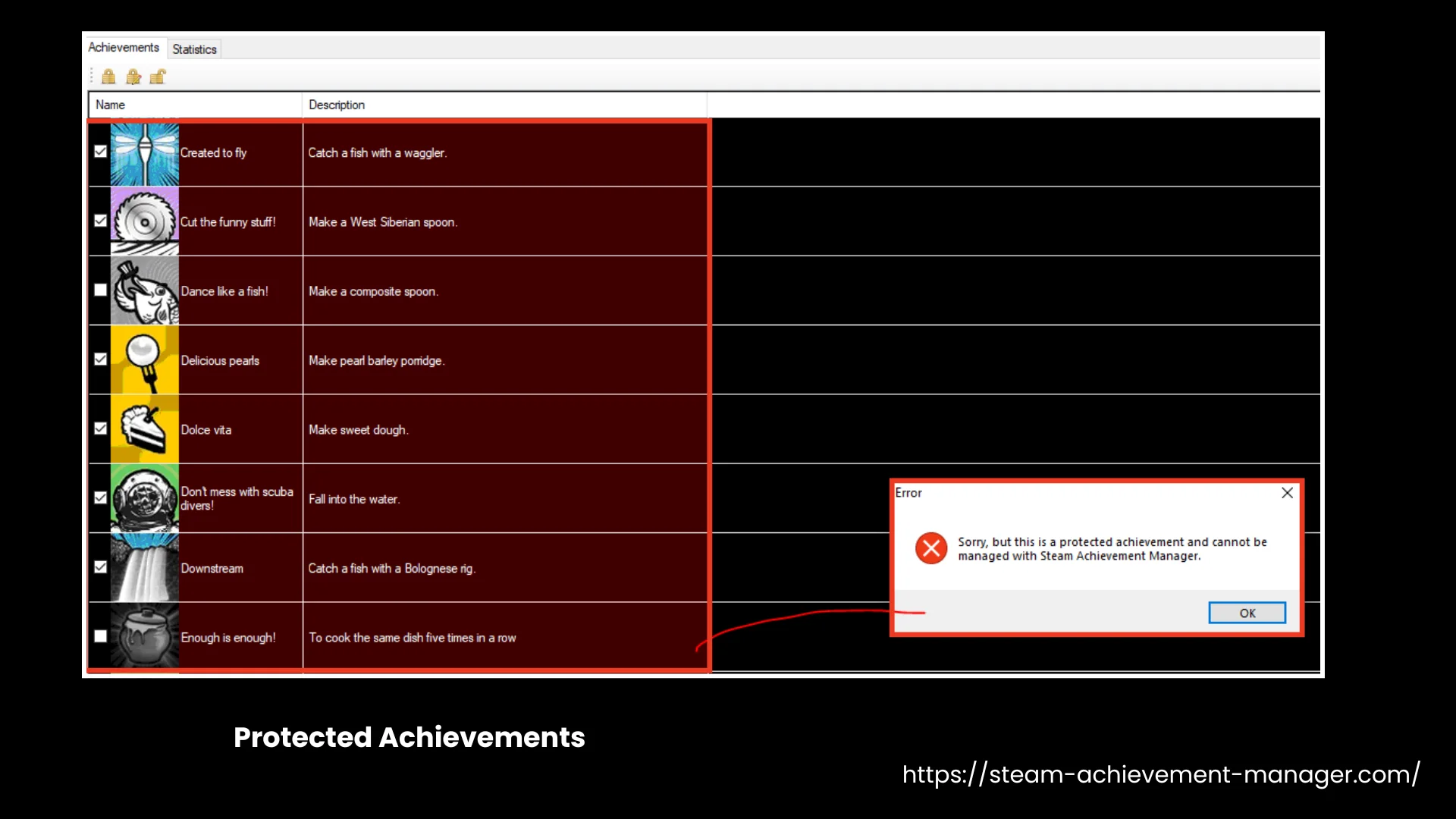
- Tick or untick the achievements you want, then click Commit Changes. Steam updates your profile immediately. If an entry turns red, it is protected and cannot be changed.
- Close SAM and restart Steam to sync your changes.
These steps cover the basics. Our detailed guide on how to use Steam Achievement Manager provides all the necessary safety tips, stat editing instructions, and reset options.
How to unlock Protected Achievements?
While using SAM, some achievements turn red and cannot be ticked. These are protected achievements, controlled by the game rather than your local Steam client, so SAM cannot change them.
Across Steam Achievement Manager Reddit discussions, players report them mostly in online titles, though some single-player games use them too. Our guide on how to use Steam Achievement Manager covers protected entries in detail, including the known workarounds.
Features in Detail
Steam Achievement Manager includes several practical features that help players control achievements, manage profiles, and understand Steam achievement behavior clearly.
Unlock Achievements for Specific Games
This feature lets players unlock specific Steam achievements manually without completing the full in-game requirements. It helps recover bugged unlocks, restore discontinued achievements where possible, or complete missed objectives. Each achievement can be toggled separately, allowing careful control instead of unlocking everything at once. The changes are applied through Steam’s achievement system, not by modifying game files.
Wide Game Compatibility
Steam Achievement Manager supports thousands of games that use the standard Steam achievement APIs, including single-player, indie, and legacy titles. Games protected by Valve Anti-Cheat, server validation, or custom systems may remain restricted. Titles such as CS, Dota 2, Destiny 2, or games that use Easy Anti-Cheat may block changes or carry additional risks, but SAM works with most supported games.
Integration with Steam Cloud
Steam Achievement Manager relies on Steam rather than managing synchronization itself. If a game uses Steam Cloud and Steam synchronizes achievement data, updates made with SAM are reflected through Steam’s normal synchronization process. When SAM changes achievement states, Steam detects the update and synchronizes it across devices where applicable. Profiles display the same achievement status after Steam completes its normal background synchronization.
Achievement Reset and Replay
SAM allows players to lock previously earned achievements and restart their progress. It helps users replay games, fix incorrect unlocks, or test progression logic. Reset actions apply through Steam’s achievement system and do not delete save files, game installations, or Steam Cloud data linked to the game.
Multi-Account Handling
Steam Achievement Manager works with multiple Steam accounts on the same system, provided you are logged in to the account you want to manage. It uses Steam’s achievement interfaces/APIs to change achievement states, rather than modifying game executables or memory. Changes are applied while Steam is running and are synchronized with Steam according to the game’s achievement system.
Portable Open-Source Tool
Steam Achievement Manager is a portable, open-source utility hosted on GitHub. It runs without installation and uses a clean interface to list games by App ID. The tool does not inject code, edit save files, or modify game executables. It communicates with Steam’s achievement APIs/interfaces to manage achievements and statistics and receives regular updates.
Why Choose Steam Achievement Manager?
Steam Achievement Manager suits players who want more control over their Steam achievements without replaying bugged or outdated content. It helps recover bugged unlocks, restore lost achievement progress in some situations, and manually manage achievement states. Developers and testers also use it to test achievement logic without playing through entire campaigns again.
- Simple interface with automatic game detection.
- Clear achievement tracking for each title.
- Useful for recovering bugged or missing achievements.
- Dated visual design.
- Not suitable for some VAC- or anti-cheat-protected multiplayer games.
Ratings and Reviews
FAQs
Does the Steam achievement Manager still work?
Yes. SAM works with Steam games that use standard Steam achievements. Some newer titles or custom anti-cheat systems may block it or cause loading issues.
Is SAM allowed on Steam?
Yes, but with limitations. Steam Achievement Manager is not officially supported or endorsed by Valve. It works with many Steam games, but using it with games that use Valve Anti-Cheat (VAC) or other anti-cheat systems may not be supported and can carry risks. For the safest experience, use SAM only with games that do not restrict achievement modifications.
Where do I download Steam Achievement Manager?
You can download SAM from our official website or its official GitHub repository to avoid modified or unsafe versions.
Is it safe to use Steam Achievement Manager?
The official GitHub release is clean. Avoid unofficial forks, don’t use SAM while actively playing a game, and never use it with VAC-protected multiplayer games or sessions.
Is Steam Achievement Manage free?
Yes. It is completely free to download and use.
Is Steam Achievement Manager available on Mac and Linux?
No, SAM is officially available for Windows only. Linux has community tools such as Samira and SamRewritten. There is no official native macOS version.
Conclusion
Steam Achievement Manager is mainly used to manage bugged, broken, or no longer obtainable achievements rather than changing gameplay or game files. Players use it to recover achievements that never triggered, reset progress for a fresh run, manually manage achievement states, or clean up profile statistics. Developers and testers also use it to verify achievement logic during development. Used correctly, SAM acts as an achievement management and recovery tool. Download Steam Achievement Manager now from our website and get started!